el
Electricfreeze
Joined:
Last Activity:
1448 member views + 11761 guest views
4 followers & following 0
infomangaschapters(354)follows璉statusscoresemotionstagsreviews(0)comments(33)MPLists(0)fans(4)
Disclaimer: For up to date information and help visit the discord server!
Experimental Quick Page Navigation
Warning: It will open the same page in a new tab and it may not work on all browsers!
Experimental Quick Page Navigation
Warning: It will open the same page in a new tab and it may not work on all browsers!
- What is happening to Mangapark?
- How can I join the discord server?
- Broken Panels - Manual fix
- Broken Panels - Automatic fix A (Desktop/Mobile) - script is now version 1.7 (08.12.2025)
- Broken Panels - Automatic fix B (Mobile) - updated (09.12.2025)
- How can I export my Manga List(s)?
- I can't access Mangapark at all! - You probably can since you are reading this!
- How does the "broken panel fix" work? - for those interested
What is going on with Mangapark?
See the discord for the newest updates!
TLDR: The future of the site is uncertain and you better back up your Manga lists in case something happens (a user script for automatic csv export can be found further down this page or in the discord in the announcement channel).
Longer answer: Shortly after the global Cloudflare outage in November multiple users reported occasionally encountering broken panels and Mangapark loading slower than usual. After the developer of the site was contacted by the (discord/site) moderators, they only gave vague answers saying that the future of the site is uncertain. Initially only the s02 subdomain was broken, but since then it has gotten worse (See the list under Broken Panels - Manual fix ) And that's pretty much everything that we know for certain. Some have speculated that it may be due to legal trouble, but nothing like that has been confirmed as of writing.
Discord Server Links
These should be working as writing:
https://discord.com/invite/mangapark
or
https://discord.gg/HXKXBTSGKS
Alternatively you can also get them from top of this page (Just click on the discord logo next to your sfw/nsfw flag)
Or by scrolling to the bottom of mirror links list page here.
Broken Panels - fix manually
https://discord.com/invite/mangapark
or
https://discord.gg/HXKXBTSGKS
Alternatively you can also get them from top of this page (Just click on the discord logo next to your sfw/nsfw flag)
Or by scrolling to the bottom of mirror links list page here.
Broken Panels - fix manually
Potential fix for broken panels: Open the picture in a new tab and change the URL in the address bar from s(00-10) to one of these:
s00
s01
s02 - broken for me
s03
s04
s05 - broken for me
s06 - broken for me
s07 - broken for me
s08 - broken for me
s09 - broken for me
s10 - broken for me
s00
s01
s03
s04
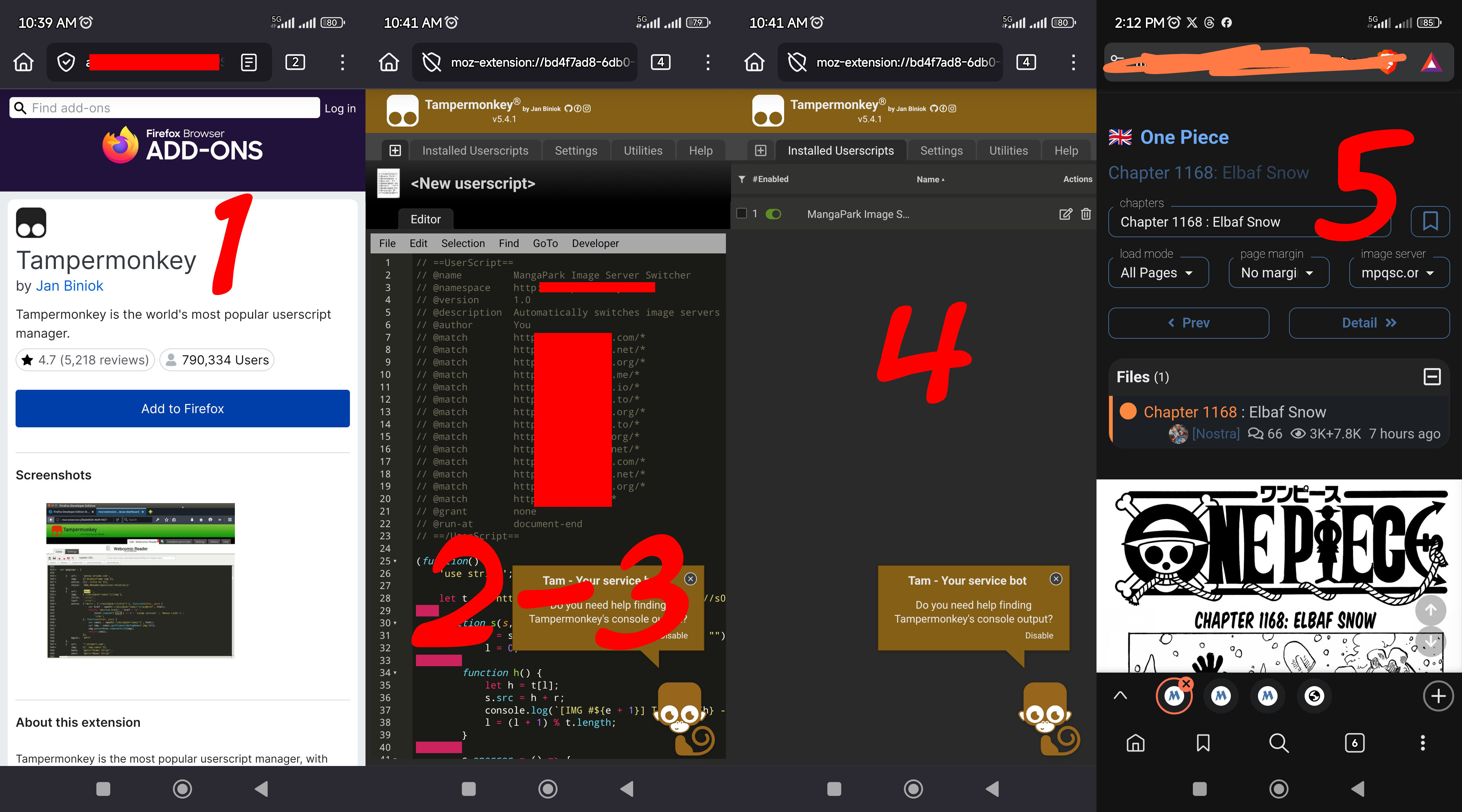
A Fix Broken Images/images not loaded for PC and Mobile (Firefox browser)
- Download Tampermonkey/Greasemonkey/Violetmonkey browser extension
- Copy the script below - The script is from from the discord server approved by the moderators. If you don't trust it or are unsure what it does ask someone knowledgeable, copy it straight from the discord(pinned message in general) or make your own with AI! A General rule of thumb: Don't blindly trust strangers on the Internet!
- Create a new script, paste the script you copied earlier.
- Save the script and check if it is enabled/turned on
- Refresh and it should have loaded the images
// ==UserScript==
// @name         MangaPark Image Server Switcher
// @namespace    http://tampermonkey.net/
// @version      1.7
// @description  Automatically switches image servers when images fail to load
// @author       You
// @include      *://mangapark.*/*
// @include      *://comicpark.*/*
// @include      *://readpark.*/*
// @include      *://parkmanga.*/*
// @include      *://mpark.*/*
// @grant        none
// @run-at       document-end
// ==/UserScript==

(function() {
    const w = new WeakSet();
    const s = ["00","01","03","04"];
    const r = /^https:\/\/s\d{2}/;

    const f = i => {
        if (w.has(i) || !r.test(i.src)) return;
        w.add(i);
        const p = i.src.replace(r, "");
        let n = 0;
        i.onerror = () => n < 4 && (i.src = `https://s${s[n++]}${p}`);
        i.src = `https://s${s[0]}${p}`;
    };

    const g = document.getElementsByTagName("img");
    for (let i = g.length; i--;) {
        g[i].complete && g[i].naturalWidth || f(g[i]);
    }

    new MutationObserver(m => {
        for (const o of m) {
            for (const n of o.addedNodes) {
                if (n.tagName === "IMG") {
                    n.complete && n.naturalWidth || f(n);
                } else if (n.getElementsByTagName) {
                    const a = n.getElementsByTagName("img");
                    for (let i = a.length; i--;) {
                        a[i].complete && a[i].naturalWidth || f(a[i]);
                    }
                }
            }
        }
    }).observe(document.body, {childList: !0, subtree: !0});
})();
Visually for mobile users on firefox:
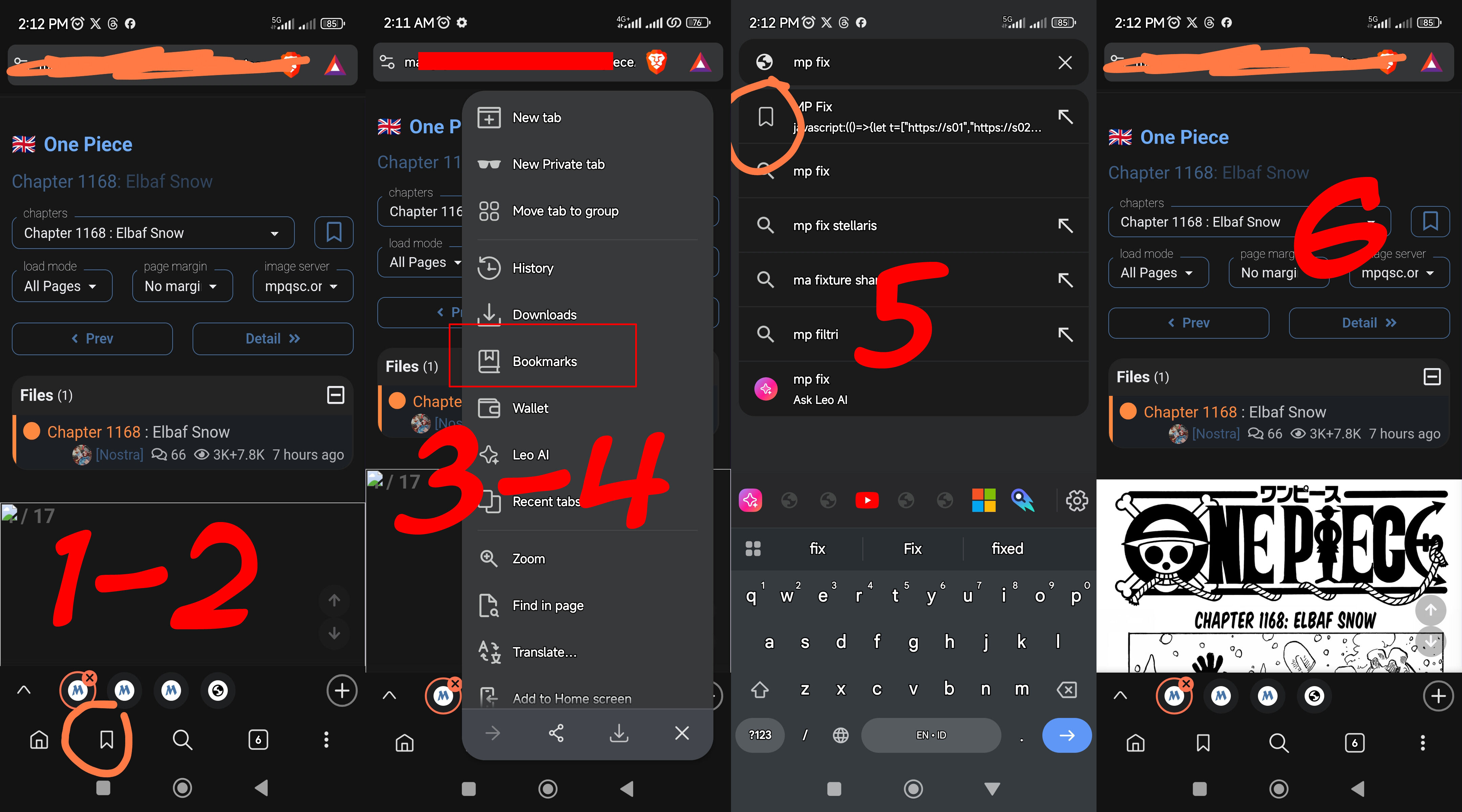
B. Fix Broken images for Mobiles (Chrome Browser/Brave Browser)
B. Fix Broken images for Mobiles (Chrome Browser/Brave Browser)
- Copy the script below: The script is from from the discord server approved by the moderators. If you don't trust it or are unsure what it does ask someone knowledgeable, copy it straight from the discord(pinned message in general) or make your own with AI! A General rule of thumb: Don't blindly trust strangers on the Internet!
- Bookmark random page
- Edit the bookmark and replace the link with script you copied earlier, rename the bookmark into something you can find easily. Ex: MP Fix, 111, wasd, etc
- After you saved the bookmark, open the comic you want to read in load all pages mode
- Tap the address bar, search your bookmark name that you edit earlier and hit the bookmark / globe icon (don't tap/hit magnifier icon).
- The broken images should load by itself.
- Do this every time you have opened a chapter.
javascript:(()=>{const hosts=["https://s01","https://s02","https://s03","https://s04","https://s05","https://s06","https://s07","https://s08","https://s09","https://s10","https://s11","https://s12","https://s13","https://s14","https://s15"],blacklist=new Set(),today=new Date().toISOString().split('T')[0];if(!window.lastResetDate||window.lastResetDate!==today){blacklist.clear();window.lastResetDate=today}function shouldSkip(img){return img.classList.contains("nsfw")||img.classList.contains("nsfw-cover")||img.src.includes("cover")||img.src.includes("nsfw")||img.src.includes("placeholder")||(img.naturalWidth>0&&img.naturalWidth<50)||(img.naturalHeight>0&&img.naturalHeight<50)}function pickRandomHost(){const goodHosts=hosts.filter(h=>!blacklist.has(h));if(goodHosts.length===0){console.warn("All CDN servers blacklisted. Resetting blacklist.");blacklist.clear();return pickRandomHost()}return goodHosts[Math.floor(Math.random()*goodHosts.length)]}function fixImage(img,index){if(!img.src.match(/^https:\/\/s\d{2}/))return;const path=img.src.replace(/^https:\/\/s\d{2}/,"");function tryLoad(){const host=pickRandomHost();const newSrc=host+path;console.log(`[IMG ${index+1}] Trying: ${newSrc}`);img.dataset.lastHost=host;img.src=newSrc}img.onerror=()=>{const bad=img.dataset.lastHost;if(bad){console.warn(`[IMG ${index+1}] ERROR: ${img.src} — blacklist ${bad}`);blacklist.add(bad)}tryLoad()};img.onload=()=>{console.log(`[IMG ${index+1}] LOADED OK: ${img.src}`)};tryLoad()}document.querySelectorAll("img").forEach((img,i)=>{if(shouldSkip(img)){console.log(`[IMG ${i+1}] Skipped (cover/nsfw/small): ${img.src}`)}else if(!img.complete||img.naturalWidth===0){fixImage(img,i)}});new MutationObserver(mutations=>{mutations.forEach(m=>{m.addedNodes.forEach(node=>{if(node.tagName==="IMG"){const i=[...document.querySelectorAll("img")].indexOf(node);if(!shouldSkip(node)&&(!node.complete||node.naturalWidth===0)){fixImage(node,i)}}})})}).observe(document.body,{childList:true,subtree:true})})();
Visually for mobile users on Brave:
How to export my Manga List?
You should do this on desktop!
You should do this on desktop!
- Open the page with your reading list on a computer
- Press F12 (Sometimes Fn + F12) or right click on the site to open Developer tools.
- There you should find a console -> Paste either of the scripts below there (depends on your preferences)
- Now a CSV file should be downloaded on your computer with your reading list of that page
- Finally, if you have multiple pages of reading history, you just need to repeat the steps above for each page
You might get an error on the console where you can't paste the scripts. If you do, type: "allow pasting" before pasting anything.
Here is where you will find the console:

Scripts:
These scripts are from from the discord server approved by the moderators. If you don't trust them or are unsure what they do ask someone knowledgeable, copy it straight from the discord(scroll up in announcements) or make your own with AI! A General rule of thumb: Don't blindly trust strangers on the Internet!
Script 1 saves the list as a CSV and Script 2 stores the list in the console output. (I personally would recommend Script 1 over Script 2)
Script1- with CSV
Scripts:
These scripts are from from the discord server approved by the moderators. If you don't trust them or are unsure what they do ask someone knowledgeable, copy it straight from the discord(scroll up in announcements) or make your own with AI! A General rule of thumb: Don't blindly trust strangers on the Internet!
Script 1 saves the list as a CSV and Script 2 stores the list in the console output. (I personally would recommend Script 1 over Script 2)
Script1- with CSV
// Version: With CSV
// ============================
(function() {
    const results = [];

    // Select all blocks containing a title
    const items = document.querySelectorAll('.flex.border-b');

    items.forEach(item => {
        const name = item.querySelector('h3 a')?.innerText?.trim();
        const chapter = item.querySelector('a[href*="chapter"] span')?.innerText?.trim();

        if (name) {
            results.push({
                name: name || "Unknown",
                lastChapter: chapter || "No chapter found"
            });
        }
    });

    console.table(results);
    console.log("Total detected:", results.length);

    // Convert to CSV
    const csvContent = [
        ["Name", "LastChapter"], // header
        ...results.map(r => [r.name, r.lastChapter])
    ].map(e => e.join(",")).join("\n");

    // Create CSV file and download automatically
    const blob = new Blob([csvContent], { type: "text/csv;charset=utf-8;" });
    const link = document.createElement("a");
    link.href = URL.createObjectURL(blob);
    link.download = "favorites_active_page.csv";
    document.body.appendChild(link);
    link.click();
    document.body.removeChild(link);

    console.log("📁 File 'favorites_active_page.csv' generated and downloaded!");
})();
Script 2 - without CSV
// ========================================
// SCRIPT: Extract Favorites
// Two versions: With CSV and Without CSV
// ========================================

// ============================
// How to use:
// 1. Open your favorites page in the browser.
// 2. Open the developer console (F12 or Ctrl+Shift+I / Cmd+Option+I).
// 3. Paste the entire script below into the console. (You could probably get en error saying you can't past there, so you juste need to write "allow pasting" or somthing else that writed in console to allow the pasting.)
// 4. Press Enter to run.
// 5. Check console output for results (Without CSV version).
// 6. A CSV file will automatically download (With CSV version).
// ============================


// ============================
// Version: Without CSV
// ============================
(function() {
    const results = [];

    // Select all blocks containing a title
    const items = document.querySelectorAll('.flex.border-b');

    items.forEach(item => {
        const name = item.querySelector('h3 a')?.innerText?.trim();
        const chapter = item.querySelector('a[href*="chapter"] span')?.innerText?.trim();

        if (name) {
            results.push({
                name: name || "Unknown",
                lastChapter: chapter || "No chapter found"
            });
        }
    });

    console.table(results);
    console.log("Total detected:", results.length);

    // Store globally for future use
    window.favoritesResults = results;
    console.log("✅ Stored results in 'window.favoritesResults' (Without CSV)");
})();
Site Access
Use a VPN / WARP
If you're unable to access the site, use VPN / WARP. Some regions may face issues with the site being down. Use a VPN to access the site from some of the European regions, especially Germany and Northern countries or some Asian regions like Singapore & Indonesia, seem to work better.
If you're unable to access the site, use VPN / WARP. Some regions may face issues with the site being down. Use a VPN to access the site from some of the European regions, especially Germany and Northern countries or some Asian regions like Singapore & Indonesia, seem to work better.
Or Try one of the official mirrors here.
How does the fix work?
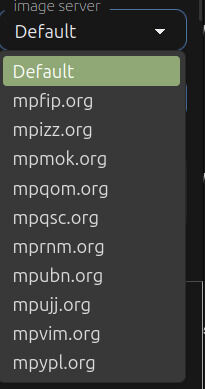
Mangapark as a large site uses multiple image servers (as you can see in the picture) to evenly distribute server load. These image servers are further divided into subdomains ranging from s00 to s10. If you open an image in a new tab it's URL looks kinda like this:
https:// [s00-s10].[image server].org/media/[...]/[image id]
What the "broken panel fix" essentially does is that we switch to a subdomain that isn't broken.
 (Last edited: 10.12.2025)
 Block User
When adding a user to your block list, if there is a friend relationship between you, it will be terminated in both directions.
Users on your blocked list:
- Unable to reply to your comments.
- Unable to send you message.
- Unable to send you friend request.
Friend Manage
Instructions:
- Need the consent of the other party to become your friend.
- Unresponsive requests automatically expire after 30 days.
- You can submit up to 100 friend requests within 30 days